

Best Freelance Platforms for Beginners (Fiverr vs Upwork) 2026
I tried both platforms for 6 months. Here’s what actually works for beginners — and which one you should start with.
Let me tell you something honest.
When I started freelancing, I had no idea where to begin. Fiverr? Upwork? Freelancer? PeoplePerHour? Every platform promised the world. Every “guru” had a different opinion.
So I tried them all.
I spent 6 months on Fiverr. I spent 6 months on Upwork. I made mistakes. I learned lessons. I almost gave up twice.
Now I want to save you from the same confusion.
Here’s the honest comparison between Fiverr and Upwork — the two largest freelance platforms in the world. Not marketing fluff. Just what actually works for beginners in 2026.
Internal link: New to freelancing? Read my guide on What is Freelancing? Top High-Paying Skills in 2026 first.
1. What Are Fiverr and Upwork? (Quick Overview)
Before I compare, let me explain both platforms simply.
Fiverr is a service marketplace where freelancers create “gigs” — packages of what they offer. Clients come to you and buy your gig. Think of it like an online store where you sell your services.
Upwork is a bidding platform where clients post jobs and freelancers send proposals. You compete with other freelancers to win the project. Think of it like applying for jobs, but online.
Both platforms are legitimate. Both have millions of users. Both can make you money. But they work very differently.
Quick win: Before picking a platform, understand your personality. Do you prefer clients coming to you (Fiverr) or do you enjoy hunting for opportunities (Upwork)?
External link: Fiverr | Upwork
2. My First 30 Days on Fiverr (The Struggle Was Real)
I started on Fiverr because everyone said it was “easier for beginners.”
I created my first gig. “I will write a 500-word blog post for $10.” I optimized my title. Wrote a description. Added portfolio samples. Waited.
Day 1: 0 views.
Day 3: 2 views. No orders.
Day 7: 5 views. Still no orders.
Day 14: I was ready to quit.
Then I changed my approach. I lowered my price to $5. I added video to my gig. I researched what successful sellers in my niche were doing.
On Day 22, I got my first order. $5 for a blog post. I was thrilled. The client left a 5-star review.

That review changed everything. After that, orders started coming slowly. One per week. Then two. Then three.
What I learned on Fiverr:
The first order is the hardest
Reviews are everything
Low prices attract first clients, not long-term success
You need patience (weeks, not days)
3. My First 30 Days on Upwork (A Different Kind of Struggle)
After 6 months on Fiverr, I tried Upwork.
I thought my Fiverr experience would make it easy. I was wrong.
Upwork is completely different. You don’t wait for clients. You find them.
I created my profile. Wrote a headline. Filled out my work history. Added portfolio samples. Then I started applying.
My first proposal: 10 minutes of work. No reply.
My tenth proposal: No reply.
My twentieth proposal: No reply.
I was frustrated. On Fiverr, at least I got views. On Upwork, I was sending proposals into a void.
Then I learned. My proposals were terrible. I was copying and pasting. I wasn’t personalizing. I wasn’t showing value.
I changed my approach. Started every proposal with a specific compliment about their project. Showed exactly how I would solve their problem. Kept it short.
On proposal #35, I got my first reply. A small blog writing project for $50. I completed it. Got a 5-star review.

On proposal #50, I got my first long-term client. Still with me today.
What I learned on Upwork:
Proposals are a numbers game (expect 20-50 before first client)
Personalization beats templates every time
Your profile matters more than your price
Upwork takes more effort upfront
Internal link: Avoid scams while applying! Read I Lost $500 to a Freelance Scam.
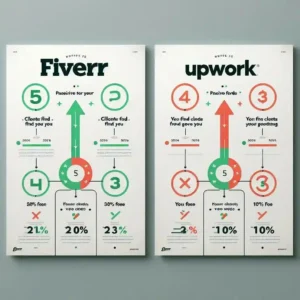
4. Fiverr vs Upwork: Quick Comparison
Let me break down the key differences.
How you get work:
Fiverr: Clients find you (passive)
Upwork: You find clients (active)
Effort to start:
Fiverr: Low (set up gig, wait)
Upwork: High (send 20-50 proposals)
Time to first client:
Fiverr: 2-4 weeks
Upwork: 1-3 weeks (if you send proposals daily)
Control over pricing:
Fiverr: You set gig prices, clients choose packages
Upwork: You bid per project or hourly
Platform fees:
Fiverr: 20% on first $500, then 8% (mostly 20% for beginners)
Upwork: 10% on all projects
Competition level:
Fiverr: High (millions of gigs)
Upwork: High (but proposals stand out with effort)
Best skill types:
Fiverr: Creative, one-off tasks (logo design, short videos, quick edits)
Upwork: Long-term projects, complex work (software dev, content strategy, SEO)
5. Which Platform Pays More? (Real Numbers)
Let me share my actual earnings.
On Fiverr:
First month: 25Secondmonth:80
Third month: 150Sixthmonth:400
On Upwork:
First month: 50Secondmonth:200
Third month: 450Sixthmonth:1200
Why the difference? Upwork clients have larger budgets. Fiverr clients often expect cheap work (5−50).Upworkclientspay50-500+ per project.
But here’s the catch. Upwork requires more effort. More proposals. More rejections. More patience.
My verdict for beginners: Start on Fiverr to get your first reviews. Then move to Upwork for higher pay.
6. Which Platform Is Better for BEGINNERS?
This is the most common question I get.
Choose Fiverr if:
You have a clear service (logo design, voiceover, short video edit)
You’re patient and can wait weeks for first order
You want to start with zero proposal writing
You’re comfortable pricing low initially ($5-20)
Choose Upwork if:
You enjoy hunting for opportunities
You’re good at writing proposals
You want higher pay from the start
You have skills in high demand (web dev, SEO, marketing)
My personal recommendation for absolute beginners: Start with Fiverr. Learn the platform. Get your first 3-5 reviews. Then open an Upwork account and start applying.
External link: Need help with your profile? Read Upwork’s Beginner Guide
7. Step-by-Step: How to Start on Fiverr
Here’s exactly what I did.
Step 1: Create a compelling gig title
Not “I will write content.” But “I will write SEO-friendly blog posts for tech websites”
Step 2: Add a video introduction
Gigs with video get more orders. Record a 30-second intro on your phone.
Step 3: Start with low prices
5−10 for your first few orders. You’re buying reviews, not making money.
Step 4: Over-deliver
Send the work early. Add a bonus. Ask for a review politely.
Step 5: Raise prices slowly
After 5 reviews, raise to 15−20.After10reviews,raiseto25-30.
Step 6: Add gig extras
Offer faster delivery, additional revisions, or extra research for added fees.
Quick win: Research top sellers in your category. See their pricing, descriptions, and packages. Don’t copy, but learn what works.
8. Step-by-Step: How to Start on Upwork
Here’s my Upwork system.
Step 1: Optimize your profile
Headline: “SEO Writer for Tech Blogs | 4+ Years Experience”
Overview: Focus on client results, not your life story.
Step 2: Start with small jobs
Apply for $20-50 projects. Build your work history and JSS (Job Success Score).
Step 3: Write personalized proposals
Every proposal must be unique. Address the client by name. Mention something specific from their job post. Show you read it.
Step 4: Send 5-10 proposals daily
It’s a numbers game. The more you send, the more replies you get.
Step 5: Follow up politely
If a client views your proposal but doesn’t reply, send one follow-up message after 2-3 days.
Step 6: Ask for feedback
After every completed project, ask the client to leave a review. Reviews build trust.
My proposal template that works:
Hi [Client Name],
I saw you need [specific task]. I’ve done similar work for [mention past client or result].
Here’s exactly how I would approach your project: [2-3 bullet points].
I can deliver this by [specific date].
Let’s hop on a quick call if you have questions.
Best,
[Your Name]
Quick win: Use your first 50 connects (Upwork’s bidding currency) on smaller projects. Save your later connects for bigger jobs.

9. Pros and Cons Summary
Fiverr Pros:
Clients come to you
No proposal writing stress
Clear pricing structure
Easier for creative services
Fiverr Cons:
High competition (20% fee)
Low prices expected
Harder to build long-term relationships
Can take weeks to get first order
Upwork Pros:
Higher pay potential
Long-term client relationships
Lower fees (10%)
More professional clients
Upwork Cons:
Requires constant proposal writing
Competitive (50+ proposals per job)
Inconsistent income early on
JSS score can be stressful
10. My Honest Final Recommendation
After 12 months on both platforms, here’s what I think.
For complete beginners: Start on Fiverr. Get your first 2-3 reviews. Learn how to work with clients. Build confidence.
For professionals with skills: Go straight to Upwork. The pay is better. The clients are more serious.
For everyone else: Use both. Fiverr for smaller, quick projects. Upwork for larger, long-term work.
My current setup: I use Fiverr for passive income (gigs still get orders without effort). I use Upwork for active income (applying to new projects weekly).
Your action step today: Pick one platform. Not both. Create your profile. Complete every section. Then spend one week mastering it.
Internal link: Need skills before you start? Read Best Payment Methods for Freelancers.
FAQ – Real Questions Beginners Ask
Which platform is easier for beginners?
Fiverr requires less active effort. Set up a gig and wait. Upwork requires daily proposal sending.
Which platform pays more?
Upwork pays more per project. Fiverr clients often expect lower prices.
Do I need to be on both platforms?
No. Start with one. Master it. Then consider adding the second.
How long until I get my first client?
Fiverr: 2-4 weeks. Upwork: 1-3 weeks (if sending proposals daily).
Can I use both platforms at the same time?
Yes. Many freelancers do. I do.

Final Thoughts
I started on Fiverr. Struggled for weeks. Got my first $5 order. Celebrated like I won the lottery.
Then I moved to Upwork. Sent 35 proposals before my first reply. Felt hopeless. Almost quit.
Today, I earn from both platforms.
You can too. But you have to start. Pick one platform today. Create your profile. Don’t wait for perfect.
Your first client is closer than you think.
External links: Fiverr | Upwork
How to Start a Tech YouTube Channel in 2026 – magtechhub.com/how-to-start-tech-youtube-channel-2026/
Honest Facebook Earnings: What Actually Works – magtechhub.com/honest-facebook-earnings-what-actually-works/